How to Convert YouTube to MP3 Legally: A Complete Guide
Converting a YouTube video to MP3 can be useful when you need an audio file for a project, backup, editing, or another permitted use. But there is an important question to answer first: Are you legally allowed to use and convert that content?
The answer depends on the video, who owns the copyright, what license applies, whether you have permission, and how you plan to use the resulting audio.
If the video is yours, you have permission from the copyright owner, or the content is available under a license that allows the use you want, converting the authorized media to MP3 can be a practical option.
This guide explains how to convert YouTube to MP3 legally, what YouTube allows, how copyright and Creative Commons licenses work, and what you should check before converting a video.
Quick answer: A YouTube to MP3 converter does not make copyrighted content legal to download. Before converting a video, make sure you own the content, have permission, or have a license or other legal basis that allows the intended use.
Is It Legal to Convert YouTube Videos to MP3?
There is no single yes-or-no answer for every YouTube video.
A YouTube video can contain copyrighted music, video, images, or other creative work. Copyright normally gives the copyright owner control over how that work is used and distributed.
In simple terms, the legality depends on your rights to the specific content and how you use it.
For example, converting your own video for your own use is very different from downloading a commercial music video and distributing the MP3 without permission.
When YouTube to MP3 Conversion Can Be Legal
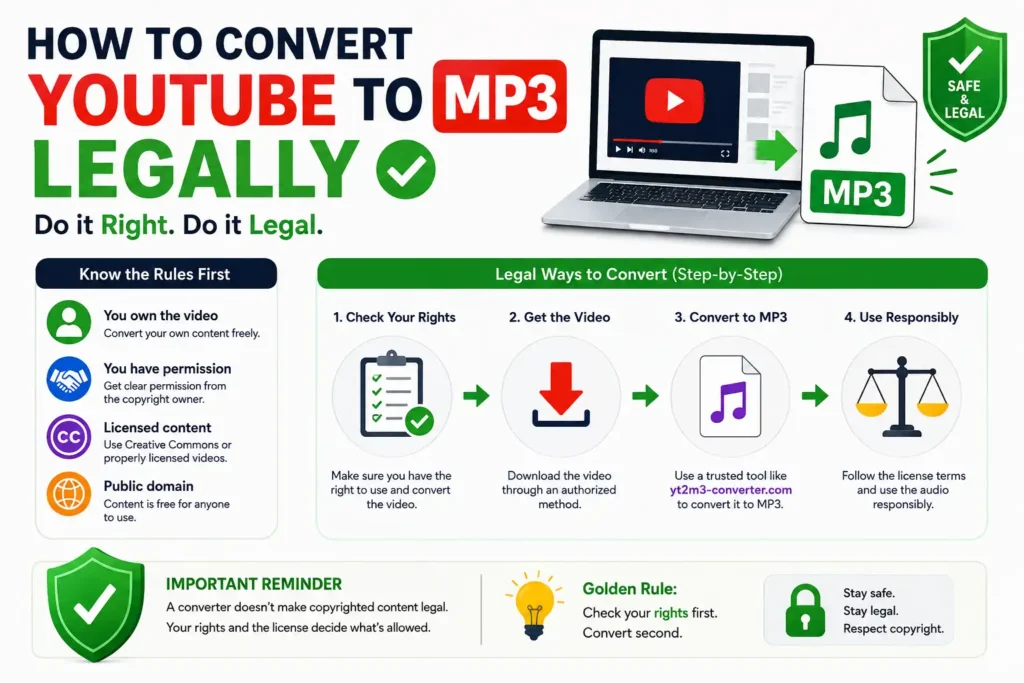
Conversion may be permitted when you have a valid right to use the content.
Common examples include:
- You created and own the video.
- The copyright owner gave you permission.
- The video is released under a license that allows the intended use.
- The content is in the public domain.
- Your particular use qualifies for an applicable copyright exception under the law that applies to you.
However, the exact rules can vary by country and situation. If the use is commercially important or legally unclear, consider getting advice from a qualified copyright professional.
When YouTube to MP3 Conversion May Not Be Legal
You should be careful when dealing with copyrighted content that you do not own.
Examples include:
- Commercial songs uploaded by rights holders.
- Movies, TV programs, or other copyrighted entertainment.
- Music videos where you do not have permission to copy or reuse the audio.
- Videos containing third-party copyrighted material.
- Content whose license does not allow the type of use you want.
Simply finding a video on YouTube does not automatically give you permission to download, copy, or redistribute it.
When Can You Legally Convert a YouTube Video to MP3?
The safest way to think about this is to start with your rights, not the converter.
Before converting a video, ask:
Do I own it, have permission to use it, or have a license that allows this use?
If the answer is yes, you can then look at the appropriate technical method for obtaining and converting the authorized media.
Videos You Own
If you uploaded the video yourself and own the rights to its content, you have much more control over how you use the media.
YouTube currently allows creators to download videos they have uploaded. YouTube says uploaded videos can be downloaded as MP4 files, subject to certain restrictions.
Once you have an authorized copy of your video, you can extract or convert its audio for a permitted purpose.
For example, you might convert your own video into MP3 for:
- A podcast version
- An audio archive
- Editing
- Backup
- Personal use
- Repurposing your own content
Videos You Have Permission to Use
You may also have permission from the copyright owner.
For example, a creator could give you written permission to use their video or audio for a specific project.
Keep a record of that permission. If possible, make sure it clearly explains:
- What content you can use
- How you can use it
- Whether you can modify it
- Whether you can distribute it
- Whether commercial use is allowed
The more specific the permission, the easier it is to understand your rights.
Appropriately Licensed Content
Some content is offered under licenses that give users specific rights.
YouTube currently supports the Standard YouTube license and Creative Commons Attribution (CC BY) for videos. Creative Commons content can be reused according to the license terms.
Do not assume that every Creative Commons video has unlimited rights. Check the actual license and follow its requirements.
Public-Domain Content
Public-domain works generally are not protected by copyright, although the rules for determining public-domain status can vary by country.
Also remember that a YouTube upload can contain multiple elements. A video may include music, recordings, images, or other material that has separate rights.
When in doubt, verify the rights to the specific content you plan to use.
How to Convert YouTube to MP3 Legally
If you have established that you are allowed to use the content, the conversion process is straightforward.
The key is to separate legal permission from technical conversion.
A converter changes the format of media. It does not give you copyright permission.
Step 1: Verify Your Rights
First, determine whether you have the right to use the video.
Ask yourself:
- Did I create the video?
- Do I own the copyright?
- Did the copyright owner give me permission?
- Is the content licensed for this use?
- Does the license allow copying or conversion?
- Are there third-party materials inside the video?
If you cannot answer these questions, do not assume that conversion is allowed.
Step 2: Obtain the Content Through an Authorized Method
Use an authorized way to obtain the media.
For your own YouTube videos, YouTube provides download options through YouTube Studio. YouTube also supports downloading your uploaded videos through Google Takeout.
For someone else’s content, follow the rights holder’s instructions or use a method specifically allowed by the applicable license or permission.
Step 3: Convert the Authorized Media to MP3
Once you have an authorized media file, you can use a suitable audio conversion tool to create an MP3 version when your rights allow that conversion.
The basic workflow is:
- Obtain the authorized media file.
- Open a compatible conversion tool.
- Select the media file.
- Choose MP3 as the output format.
- Start the conversion.
- Save the resulting audio file.
For content you own or are authorized to convert, yt2m3-converter.com can be used as an audio-conversion option where its supported workflow and your rights permit the conversion.
Step 4: Follow the License or Permission Terms
After conversion, continue to follow the rules attached to the original content.
For example, a license may require attribution.
If you received permission for personal use only, that does not automatically give you permission to publish or sell the MP3.
The rights attached to the original content continue to matter after conversion.
Can You Convert Your Own YouTube Videos to MP3?
Yes, this is one of the clearest use cases.
If you created a YouTube video and own the necessary rights to its content, you may want an audio-only version for another project.
YouTube currently provides creators with a way to download videos they have uploaded. YouTube states that these downloads are available through YouTube Studio, with some restrictions.
A simple workflow is:
- Sign in to YouTube Studio.
- Open your content.
- Select the video you own.
- Download the available video file.
- Convert the authorized video file to MP3.
- Use the MP3 according to your rights.
What You Can Do With the Converted Audio
Depending on your rights, you might use your audio file for:
- Podcast production
- Audio editing
- Personal backup
- Content repurposing
- Voice or speech projects
- Personal listening
- Archiving
Be careful if your video contains music, clips, images, or other material created by someone else. Owning the YouTube upload does not always mean you own every element inside the video.
Can You Convert Creative Commons YouTube Videos to MP3?
Sometimes, but you need to understand the license first.
YouTube explains that Creative Commons Attribution, or CC BY, allows other creators to reuse content subject to the license terms. Attribution is generally required when using another creator’s CC BY work.
What Is Creative Commons?
Creative Commons is a licensing system that allows creators to give others certain permissions to use their work.
Instead of asking for individual permission every time, a creator can publish content under a license with defined conditions.
Check the License Before Converting
Do not stop at the words “Creative Commons.”
Check:
- Which Creative Commons license applies?
- Is commercial use allowed?
- Is modification allowed?
- Is attribution required?
- Are there additional conditions?
- Does the creator actually have the rights to license all parts of the content?
YouTube says users can find Creative Commons content through the appropriate search filter and can also check license information in video details.
Attribution Requirements
If the content is licensed under CC BY, attribution is an important requirement.
YouTube recommends including information such as:
- Title of the work
- Author
- Source
- License information
Follow the actual license terms rather than assuming that a simple credit is enough for every situation.
Does YouTube Premium Let You Download MP3 Files?
No. YouTube Premium’s offline download feature is not the same as downloading a standalone MP3 file.
YouTube’s current Help documentation states that audio, music, or MP3 files cannot be downloaded directly from the YouTube app.
YouTube Premium allows eligible users to download videos for offline playback within YouTube. YouTube explains that these downloads are designed for offline viewing and remain within the YouTube experience.
What YouTube Premium Allows
Depending on availability and account eligibility, YouTube Premium can let you:
- Download videos for offline viewing
- Watch downloaded content without an internet connection
- Manage offline downloads through YouTube
YouTube Music Premium also provides offline listening features inside the YouTube Music app.
Can YouTube Premium Download MP3 Files?
Not as a standalone MP3 export from the YouTube app.
This is an important difference:
Offline download ≠ MP3 file ownership.
If you need a standalone MP3 of content, you need to make sure that you have the appropriate rights and use an authorized method for obtaining and converting the content.
Is YouTube to MP3 Legal for Personal Use?
Personal use does not automatically make every YouTube-to-MP3 conversion legal.
This is one of the most common misunderstandings around the topic.
Whether a particular use is permitted can depend on:
- Copyright ownership
- Permission
- Content licensing
- The type of use
- Your country
- Applicable copyright exceptions
- YouTube’s terms and features
For example, converting your own video for personal use is very different from copying a commercial song that you do not have permission to use.
In the United States, certain copyright exceptions such as fair use can apply in specific circumstances, but YouTube notes that fair-use decisions depend on the facts of each case and are ultimately determined by courts.
So avoid the simple rule:
“It is for personal use, so it is always legal.”
That statement is too broad.
YouTube Terms of Service vs. Copyright Law
Copyright law and YouTube’s platform rules are related, but they are not the same thing.
YouTube Terms of Service
YouTube has rules that govern how its service and content can be used.
A particular action may raise a platform-policy issue even when someone believes they have a copyright-related argument.
Copyright Law
Copyright law determines rights in creative works and provides certain exceptions and permissions depending on the country and circumstances.
YouTube explains that copyright owners generally control important rights involving their creative works. It also identifies permission, Creative Commons licensing, public domain, and certain copyright exceptions as possible ways content may be used.
Why Both Matter
When deciding whether to convert a YouTube video to MP3, consider two separate questions:
Question 1: Do I have the legal right to use this content?
Question 2: Does the method I am using comply with YouTube’s applicable rules and authorized features?
Considering both questions helps you avoid confusing copyright permission with permission to use a particular platform feature.
How to Check If a YouTube Video Can Be Legally Converted
Before converting a video, use this simple checklist.
1. Do You Own the Video?
If you created it, determine whether you also own the rights to all major elements inside it.
2. Do You Have Permission?
If another person owns the content, check whether they have given you permission.
3. What License Does the Video Have?
Check whether it uses the Standard YouTube license or a Creative Commons license.
4. Does the License Allow Your Intended Use?
A license may allow some uses but restrict others.
5. Does the Video Contain Third-Party Material?
A creator may upload a video that includes music, footage, or other copyrighted material owned by someone else.
6. Are You Planning Commercial Use?
Commercial use can involve different rights and licensing requirements.
7. Do You Need to Give Attribution?
If the license requires attribution, keep the required credit with your use of the content.
8. Are You Following Applicable Laws?
Copyright exceptions and other legal rules vary between countries.
If the answer to these questions is unclear, do more research before converting or distributing the content.
Common YouTube to MP3 Legal Mistakes
Mistake 1: Assuming Every YouTube Video Is Free to Download
A video being publicly available does not automatically mean that you have permission to copy and reuse it.
Mistake 2: Assuming Personal Use Always Makes It Legal
Personal use can matter in some legal situations, but it is not a universal permission rule.
Mistake 3: Assuming Creative Commons Means “No Restrictions”
Creative Commons licenses have conditions.
For example, CC BY generally requires attribution when you use another creator’s work.
Mistake 4: Ignoring Music Copyright
A video can contain music created or owned by someone else.
Even if you have permission to use the video itself, check whether that permission also covers the music.
Mistake 5: Confusing YouTube Premium Downloads With MP3 Files
Premium offline downloads are designed for playback within YouTube. They are not the same as exporting a standalone MP3.
Mistake 6: Thinking the Converter Provides Permission
A conversion website can change a media format.
It cannot transfer copyright ownership or give you permission that you do not already have.
How to Use a YouTube to MP3 Converter Responsibly
A responsible approach starts with the content, not the tool.
Before using any converter, make sure you have the right to convert the media.
If you own the content or have permission to use it, a conversion tool can make the technical process easier.
For example, yt2m3-converter.com can be useful when you need to convert media to MP3 for a permitted purpose.
The important distinction is:
The tool performs the conversion; your rights determine whether the intended use is permitted.
Use It With Content You Own or Are Authorized to Convert
Good examples include:
- Your own videos
- Authorized client content
- Properly licensed media
- Content where the copyright owner has given you permission
Respect Copyright and Licensing Requirements
If the content requires attribution, provide it.
If commercial use is restricted, do not use it commercially without the necessary rights.
If you only have permission for a specific purpose, stay within that permission.
Legal Alternatives to YouTube to MP3 Converters
A converter is not always the best option.
Depending on what you want to accomplish, there may be a more direct approach.
Download Your Own YouTube Videos
If you uploaded the video yourself, YouTube provides download options through YouTube Studio.
You can then work with your authorized media file.
YouTube Premium Offline Features
YouTube Premium provides official offline viewing for eligible content and supported devices.
This is useful when your goal is simply to watch or listen offline inside YouTube rather than create a separate MP3 file.
YouTube Music Premium
YouTube Music Premium provides offline listening within the YouTube Music app.
YouTube Audio Library
If your goal is to find music or sound effects that you can legally use in your own projects, YouTube points creators toward its Audio Library and other copyright-safe options.
Get Permission From the Copyright Owner
If you want to use someone else’s content and no suitable license is available, contacting the rights holder is often the clearest path.
YouTube explains that it cannot grant you rights to another person’s content. Users may need to contact the creator or rights holder directly.
Frequently Asked Questions
Is it legal to convert YouTube videos to MP3?
It depends on the content and your rights to use it. If you own the content, have permission, or have a license that allows the intended use, conversion may be permitted. Converting copyrighted content without the necessary rights can create legal or policy issues.
Is YouTube to MP3 legal for personal use?
Personal use does not automatically make every conversion legal. The answer depends on copyright, licensing, permission, applicable law, and the specific circumstances.
Can I legally convert my own YouTube video to MP3?
If you own the necessary rights to the video and its contents, converting your own authorized media into MP3 can be a valid use case. YouTube currently allows creators to download videos they have uploaded through YouTube Studio, subject to its restrictions.
Can I convert Creative Commons YouTube videos to MP3?
It depends on the specific Creative Commons license and the intended use. YouTube’s CC BY license allows reuse subject to its conditions, including attribution. Always check the license before using the content.
Does YouTube Premium let you download MP3 files?
No. YouTube’s current Help documentation says that audio, music, or MP3 files cannot be downloaded directly from the YouTube app. Premium provides offline video features, while YouTube Music Premium provides offline listening within the YouTube Music app.
Can I convert copyrighted YouTube music to MP3?
You should not assume that you can. If you do not own the music or have permission or another applicable legal basis, converting and using the recording may raise copyright issues.
Does using a YouTube to MP3 converter make the download legal?
No.
A converter is a technical tool. It does not give you copyright permission.
The legality depends on your rights to the content, the applicable license or permission, the intended use, and applicable law.
What is the safest way to convert YouTube to MP3 legally?
The safest approach is to convert content that you own or are clearly authorized to use. For someone else’s content, check the license or obtain permission before converting it.
Conclusion
How to convert YouTube to MP3 legally starts with one simple question: Do you have the right to use the content?
If you own the video, have permission from the copyright owner, or have an applicable license that allows your intended use, you can then choose an appropriate method for obtaining and converting the authorized media.
If you do not have those rights, do not assume that a free converter, personal use, or a Creative Commons label automatically makes the conversion legal.
YouTube’s current tools also make an important distinction: creators can download videos they have uploaded, while YouTube’s app does not provide direct standalone MP3 downloads. Premium provides offline playback features rather than an MP3 export function.
The simplest rule is:
Check your rights first. Convert second.
For content you own or are authorized to convert, a tool such as yt2m3-converter.com can be used as part of the technical conversion process.